Thursday, July 21, 2022

Campaign Manager: Continuous Canvas

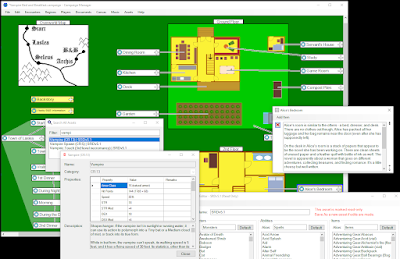
Many small improvements have been made throughout the Campaign Manager software, but the major update this release is the "continuous canvas". There is no longer any need to manually define the size of the canvas where encounters and regions reside. The canvas and scroll bars automatically shrink/grow as the user creates components, zooms, and pans.


You can download Campaign Manager from:

https://kamoly.itch.io/campaign-manager

Wednesday, June 15, 2022

Campaign Manager: Player View

For some encounters in my DnD group, I had been making paper battle maps with the occasional 3D structure. The issue was there were so many areas the players could get into combat and physical battle maps take so much time to produce. Also, I wanted to take it up a notch.

The latest new feature for Campaign Manager is the ability to display battle maps on a second screen for players to see / have their character minis on.


On the game master side, there is a "Player View Control" form to select which image to show, its scale and orientation, and an optional grid to draw. For convenience, it shows a cloned view of what the players will see.

A second "Player View" form is for the players. The view is ideally shown on a second monitor for the players - the form can be set to always on top with no borders to completely fill the screen.  


I tried to streamline the setup as much as possible. If Campaign Manager detects a second monitor when you open the "Player View", it asks a single Yes/No question if to auto-configure. If you answer yes then it will open the Player View form on the second monitor, maximized, always on top, and black. Then I can select which battle map to use, but it's not shown to the players until I click the "Draw Player View" option.

You can download Campaign Manager from:

https://kamoly.itch.io/campaign-manager

Thursday, May 19, 2022

Campaign Manager: Icons and Snapping

Most recent significant changes have been improvements to the user interface.

Icons have been added to all the main menu items, which gives it a much more polished look.


Functionality wise, when dragging encounters/regions or resizing regions, they will now snap to nearby encounters/regions to help keep everything aligned.


You can download Campaign Manager from:

https://kamoly.itch.io/campaign-manager

Friday, April 22, 2022

Campaign Manager: Name Generator

First, my kamoly.com website has been revamped to actually be professional looking! It has links to obtain both Slay the Oly Dragon and Campaign Manager.


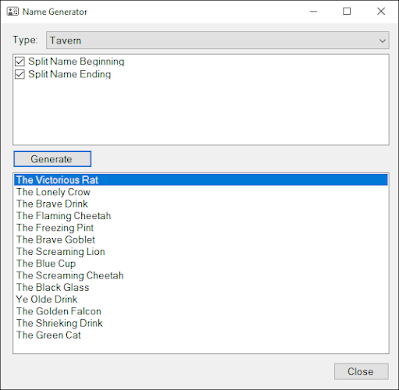
Second, the big development update is a random name generator for Campaign Manager.


It pulls from a list of hundreds of thousands of options to randomly generate names for people, towns, shops, and ships.

Some names are randomly pulled together from two separate lists (for example first and last names) or to give many interesting options (such as "The Hidden Dragon" or "The Mystic Shop").


The database is externalized so the user can create their own lists to mix & match and pull names from.

You can download Campaign Manager from:

https://kamoly.itch.io/campaign-manager

Thursday, March 24, 2022

Campaign Manager: Shadows, Dice, and Search

Several notable improvements for the latest version of Campaign Manager:

1. I polished up the appearances of encounters and regions with rounded corners and drop shadows:

2. I added a Dice tool:

Just clicking on one of the dice images "rolls" it. You can combine multiple dice by selecting one after the other and then optionally log them.

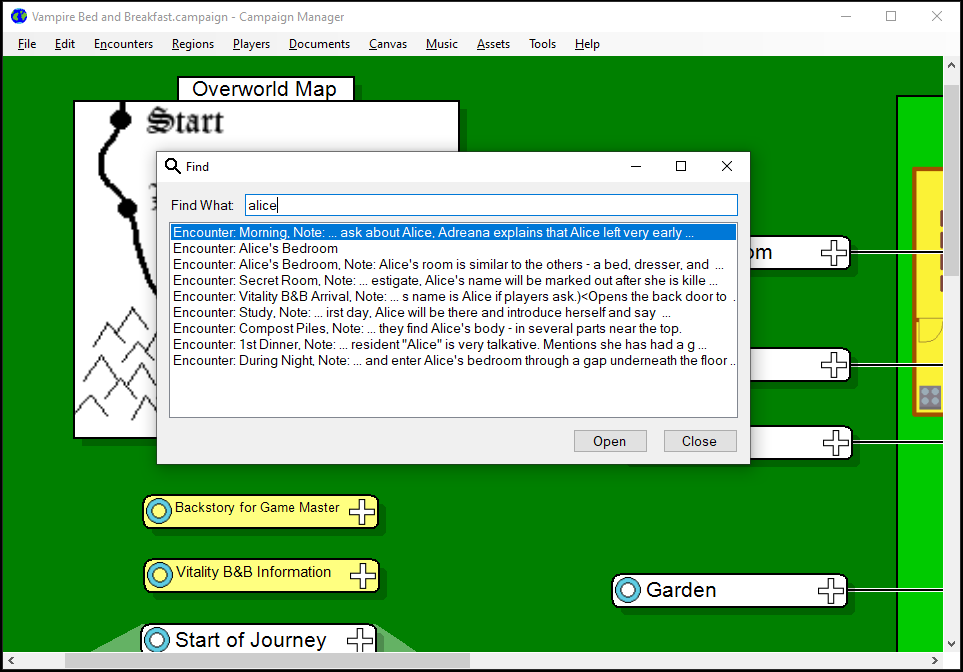
3. And best of all, a search feature! This was a must have as I had a couple moments with my players where they referenced something in the past and I had to rummage through multiple encounters trying to find the correct one. Now with the search feature finding the relevant encounter is incredibly fast. You can double click on one of the results to open the noted encounter.


You can download Campaign Manager from:

https://kamoly.itch.io/campaign-manager


Tuesday, February 22, 2022

Campaign Manager: Sample Campaign

A sample one-shot table top campaign has been added to Campaign Manager to demonstrate many of its features and how it can be used.

The campaign involves a mystery of several villagers that have gone missing in nearby towns. A band of adventurers has been hired to find out what's happening, recover the lost people, and prevent future disappearances. The campaign goes across a few days in game time in which the players discover the missing people had gone to a Bed and Breakfast in the country. When the players get there, they find the hosts aren't quite right.

The sample campaign demonstrates regions with overworld and interior maps, a timeline of events linked together, encounters with descriptions and music for the players, and finally a combat. The entire sample is within the limits of the Free version of the software to further demonstrate what is capable even in that version.

Available now at: https://kamoly.itch.io/campaign-manager

Wednesday, January 26, 2022

Campaign Manager: Released!

Took a lot for the final push, but Campaign Manager is officially released and available on itch.io!

https://kamoly.itch.io/campaign-manager

I have 2 versions posted: A free trial version that is limited to 30 encounters (which is actually quite a few) and a full version for a very small price.

The marathon changes this past month include:

  • Fixed formatting in SRD v5.1 assets.

  • Associated .campaign files in File Explorer to open Campaign Manager.

  • Made nicer icons for add/edit/remove buttons.

  • Added keyboard shortcuts for closing forms.
  • Added appropriate icons to all forms.

  • Added ability to assign an asset character type and description to a player or npc.

  • When creating a combat, use the initiative and health from the character type.
  • Add encounter over region by right clicking on it.

  • Improvements to sample campaigns.
  • Fixes to read-only assets / permissions in installed ProgramData path.
  • Created trial version.
  • Automated script that compiles and builds trial and release installers with a single click.
  • Offer to open existing combats instead of always creating new.

  • Added copy option for assets.
  • Added Barbarian and Cleric NPC assets.

  • Cleaned up variable names in campaign XML file.
  • A bunch of other little glitches and bugs fixed.

Please download the trial and give it a shot! More features will be added, but I'd love to get feedback on what should have priority.