I've done a lot of work on my servo controller project, but I don't have much to say. Luckily, I have progress pictures. :-)
I designed and 3-D printed a test stand for 9 servos.
All servos low...
All servos neutral...
All servos high...
Currently in the works is binary communication with the Arduino to efficiently give servo commands. Once that is complete, I'll begin thorough testing to decide which servo is best for my application.
Saturday, August 29, 2015
Sunday, August 16, 2015
Servo Controller: Servo Control via .NET Application
Using the Serial Monitor in the Arduino IDE was convenient for quick testing, but ultimately I want a custom application to control all my servos. So my next step was to recreate the Serial Monitor as my own application (that I could eventually expand upon).
I created a very simple VB.NET application to communicate over a serial port. A couple notes on it:
- The program automatically connects to the first COM port it finds. That's generally pretty safe as nowadays the average computer user doesn't have any devices that communicate over a serial port. (Ahh, I remember back in the day, before USB, when you plugged the mouse into a COM port. Or Doom over serial, good times.) This automatic connection is dangerous if you do have devices such as 3-D printers that communicate over a COM port.
- The baud rate and similar are hard coded to match my Arduino code, but you may want to expose that as a configurable item.
The first dropdown list is for the COM port (automatically selected to the first found at startup). It is named ddlCOMPort.
The buttons from left to right are: btnConnect, btnDisconnect, btnRefreshPorts, btnClear, and btnSend.
The input text box is txtSend, and the output read-only text box is txtReceive.
Imports System.IO.Ports
Public Class FormMain
''' <summary>
''' Definite a delegate to transfer incoming data from the background
''' (serial) thread to the foreground (UI) thread.
''' </summary>
''' <param name="incomingBuffer"></param>
''' <remarks></remarks>
Private Delegate Sub ProcessIncomingTextDelegate(ByVal incomingBuffer As String)
''' <summary>
''' The serial port object that will communicate.
''' </summary>
''' <remarks></remarks>
Private WithEvents connectedSerialPort As New SerialPort()
Public Sub New()
' This call is required by the designer.
InitializeComponent()
' Add any initialization after the InitializeComponent() call.
End Sub
Private Sub FormMain_Load(sender As Object, e As EventArgs) Handles MyBase.Load
Try
refreshPortsList()
If ddlCOMPort.SelectedIndex >= 0 Then
' Port is found, attempt to connect to it.
connectSerialPort()
Else
' Update which controls are enabled (so disconnect button is disabled at startup).
updateConnectedEnableFields()
End If
Catch ex As Exception
End Try
End Sub
Private Sub btnConnect_Click(sender As Object, e As EventArgs) Handles btnConnect.Click
Try
connectSerialPort()
Catch ex As Exception
End Try
End Sub
Private Sub btnDisconnect_Click(sender As Object, e As EventArgs) Handles btnDisconnect.Click
Try
disconnectSerialPort()
Catch ex As Exception
End Try
End Sub
Private Sub btnSend_Click(sender As Object, e As EventArgs) Handles btnSend.Click
Try
connectedSerialPort.Write(txtSend.Text + vbCrLf)
txtSend.Text = ""
Catch ex As Exception
End Try
End Sub
Private Sub connectedSerialPort_DataReceived(sender As Object, e As SerialDataReceivedEventArgs) Handles connectedSerialPort.DataReceived
Try
' Received data from the serial port, send it for processing.
processIncomingData(connectedSerialPort.ReadExisting())
Catch ex As Exception
End Try
End Sub
Private Sub connectedSerialPort_ErrorReceived(sender As Object, e As SerialErrorReceivedEventArgs) Handles connectedSerialPort.ErrorReceived
Try
Catch ex As Exception
End Try
End Sub
Private Sub btnRefreshPorts_Click(sender As Object, e As EventArgs) Handles btnRefreshPorts.Click
Try
refreshPortsList()
Catch ex As Exception
End Try
End Sub
Private Sub btnClear_Click(sender As Object, e As EventArgs) Handles btnClear.Click
Try
txtReceive.Text = ""
Catch ex As Exception
End Try
End Sub
''' <summary>
''' Returns if the serial port is currently connected.
''' </summary>
''' <value></value>
''' <returns></returns>
''' <remarks></remarks>
Private ReadOnly Property isSerialPortConnected
Get
Return connectedSerialPort.IsOpen()
End Get
End Property
''' <summary>
''' Update whether or not each UI control should be enabled based on
''' the connection state.
''' </summary>
''' <remarks></remarks>
Private Sub updateConnectedEnableFields()
Try
Dim isConnected As Boolean = isSerialPortConnected
btnConnect.Enabled = Not isConnected
btnDisconnect.Enabled = isConnected
ddlCOMPort.Enabled = Not isConnected
btnRefreshPorts.Enabled = Not isConnected
btnSend.Enabled = isConnected
Catch ex As Exception
End Try
End Sub
''' <summary>
''' Connect to the selected serial port.
''' </summary>
''' <remarks></remarks>
Private Sub connectSerialPort()
Try
If ddlCOMPort.SelectedIndex >= 0 Then
connectedSerialPort.PortName = ddlCOMPort.SelectedItem
connectedSerialPort.BaudRate = 9600
connectedSerialPort.WriteTimeout = -1
connectedSerialPort.ReadTimeout = -1
connectedSerialPort.ReadBufferSize = 4096
connectedSerialPort.WriteBufferSize = 2048
connectedSerialPort.Parity = IO.Ports.Parity.None
connectedSerialPort.StopBits = IO.Ports.StopBits.One
connectedSerialPort.DataBits = 8
connectedSerialPort.Open()
End If
updateConnectedEnableFields()
Catch ex As Exception
End Try
End Sub
''' <summary>
''' Disconnect the serial port.
''' </summary>
''' <remarks></remarks>
Private Sub disconnectSerialPort()
Try
connectedSerialPort.Close()
updateConnectedEnableFields()
Catch ex As Exception
End Try
End Sub
''' <summary>
''' Detect available serial ports and update the COM port list.
''' </summary>
''' <remarks></remarks>
Private Sub refreshPortsList()
Try
' Keep track of the selected port so we can reselect it after fresh.
Dim currentlySelectedPort As String = ddlCOMPort.SelectedItem
' Get the available ports and update the dropdown list.
Dim availablePorts As Array = IO.Ports.SerialPort.GetPortNames()
ddlCOMPort.Items.Clear()
ddlCOMPort.Items.AddRange(availablePorts)
' Reselect the previously selected port as a default.
If currentlySelectedPort IsNot Nothing Then
If ddlCOMPort.Items.Contains(currentlySelectedPort) Then
ddlCOMPort.SelectedItem = currentlySelectedPort
End If
End If
If ddlCOMPort.SelectedIndex = -1 AndAlso ddlCOMPort.Items.Count > 0 Then
' No port selected but one is available, default to it.
ddlCOMPort.SelectedIndex = 0
End If
Catch ex As Exception
End Try
End Sub
''' <summary>
''' Function to process incoming data from the serial port.
''' </summary>
''' <param name="incomingBuffer"></param>
''' <remarks></remarks>
Private Sub processIncomingData(ByVal incomingBuffer As String)
Try
If txtReceive.InvokeRequired Then
' On background (serial port) thread. Invoke a delegate to call this
' function again on the foreground (UI) thread.
Dim incomingTextDelegate As New ProcessIncomingTextDelegate(AddressOf processIncomingData)
Me.Invoke(incomingTextDelegate, New Object() {incomingBuffer})
Else
' On foreground (UI) thread. Process the message.
txtReceive.Text += incomingBuffer
End If
Catch ex As Exception
End Try
End Sub
End Class
I created a very simple VB.NET application to communicate over a serial port. A couple notes on it:
- The program automatically connects to the first COM port it finds. That's generally pretty safe as nowadays the average computer user doesn't have any devices that communicate over a serial port. (Ahh, I remember back in the day, before USB, when you plugged the mouse into a COM port. Or Doom over serial, good times.) This automatic connection is dangerous if you do have devices such as 3-D printers that communicate over a COM port.
- The baud rate and similar are hard coded to match my Arduino code, but you may want to expose that as a configurable item.
The application in action:
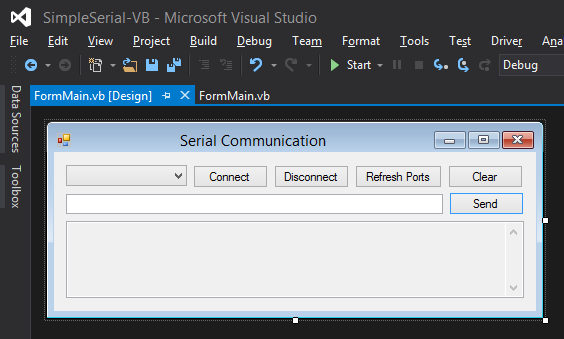
The application in Visual Studio's designer:
The first dropdown list is for the COM port (automatically selected to the first found at startup). It is named ddlCOMPort.
The buttons from left to right are: btnConnect, btnDisconnect, btnRefreshPorts, btnClear, and btnSend.
The input text box is txtSend, and the output read-only text box is txtReceive.
The code:
Imports System.IO.Ports
Public Class FormMain
''' <summary>
''' Definite a delegate to transfer incoming data from the background
''' (serial) thread to the foreground (UI) thread.
''' </summary>
''' <param name="incomingBuffer"></param>
''' <remarks></remarks>
Private Delegate Sub ProcessIncomingTextDelegate(ByVal incomingBuffer As String)
''' <summary>
''' The serial port object that will communicate.
''' </summary>
''' <remarks></remarks>
Private WithEvents connectedSerialPort As New SerialPort()
Public Sub New()
' This call is required by the designer.
InitializeComponent()
' Add any initialization after the InitializeComponent() call.
End Sub
Private Sub FormMain_Load(sender As Object, e As EventArgs) Handles MyBase.Load
Try
refreshPortsList()
If ddlCOMPort.SelectedIndex >= 0 Then
' Port is found, attempt to connect to it.
connectSerialPort()
Else
' Update which controls are enabled (so disconnect button is disabled at startup).
updateConnectedEnableFields()
End If
Catch ex As Exception
End Try
End Sub
Private Sub btnConnect_Click(sender As Object, e As EventArgs) Handles btnConnect.Click
Try
connectSerialPort()
Catch ex As Exception
End Try
End Sub
Private Sub btnDisconnect_Click(sender As Object, e As EventArgs) Handles btnDisconnect.Click
Try
disconnectSerialPort()
Catch ex As Exception
End Try
End Sub
Private Sub btnSend_Click(sender As Object, e As EventArgs) Handles btnSend.Click
Try
connectedSerialPort.Write(txtSend.Text + vbCrLf)
txtSend.Text = ""
Catch ex As Exception
End Try
End Sub
Private Sub connectedSerialPort_DataReceived(sender As Object, e As SerialDataReceivedEventArgs) Handles connectedSerialPort.DataReceived
Try
' Received data from the serial port, send it for processing.
processIncomingData(connectedSerialPort.ReadExisting())
Catch ex As Exception
End Try
End Sub
Private Sub connectedSerialPort_ErrorReceived(sender As Object, e As SerialErrorReceivedEventArgs) Handles connectedSerialPort.ErrorReceived
Try
Catch ex As Exception
End Try
End Sub
Private Sub btnRefreshPorts_Click(sender As Object, e As EventArgs) Handles btnRefreshPorts.Click
Try
refreshPortsList()
Catch ex As Exception
End Try
End Sub
Private Sub btnClear_Click(sender As Object, e As EventArgs) Handles btnClear.Click
Try
txtReceive.Text = ""
Catch ex As Exception
End Try
End Sub
''' <summary>
''' Returns if the serial port is currently connected.
''' </summary>
''' <value></value>
''' <returns></returns>
''' <remarks></remarks>
Private ReadOnly Property isSerialPortConnected
Get
Return connectedSerialPort.IsOpen()
End Get
End Property
''' <summary>
''' Update whether or not each UI control should be enabled based on
''' the connection state.
''' </summary>
''' <remarks></remarks>
Private Sub updateConnectedEnableFields()
Try
Dim isConnected As Boolean = isSerialPortConnected
btnConnect.Enabled = Not isConnected
btnDisconnect.Enabled = isConnected
ddlCOMPort.Enabled = Not isConnected
btnRefreshPorts.Enabled = Not isConnected
btnSend.Enabled = isConnected
Catch ex As Exception
End Try
End Sub
''' <summary>
''' Connect to the selected serial port.
''' </summary>
''' <remarks></remarks>
Private Sub connectSerialPort()
Try
If ddlCOMPort.SelectedIndex >= 0 Then
connectedSerialPort.PortName = ddlCOMPort.SelectedItem
connectedSerialPort.BaudRate = 9600
connectedSerialPort.WriteTimeout = -1
connectedSerialPort.ReadTimeout = -1
connectedSerialPort.ReadBufferSize = 4096
connectedSerialPort.WriteBufferSize = 2048
connectedSerialPort.Parity = IO.Ports.Parity.None
connectedSerialPort.StopBits = IO.Ports.StopBits.One
connectedSerialPort.DataBits = 8
connectedSerialPort.Open()
End If
updateConnectedEnableFields()
Catch ex As Exception
End Try
End Sub
''' <summary>
''' Disconnect the serial port.
''' </summary>
''' <remarks></remarks>
Private Sub disconnectSerialPort()
Try
connectedSerialPort.Close()
updateConnectedEnableFields()
Catch ex As Exception
End Try
End Sub
''' <summary>
''' Detect available serial ports and update the COM port list.
''' </summary>
''' <remarks></remarks>
Private Sub refreshPortsList()
Try
' Keep track of the selected port so we can reselect it after fresh.
Dim currentlySelectedPort As String = ddlCOMPort.SelectedItem
' Get the available ports and update the dropdown list.
Dim availablePorts As Array = IO.Ports.SerialPort.GetPortNames()
ddlCOMPort.Items.Clear()
ddlCOMPort.Items.AddRange(availablePorts)
' Reselect the previously selected port as a default.
If currentlySelectedPort IsNot Nothing Then
If ddlCOMPort.Items.Contains(currentlySelectedPort) Then
ddlCOMPort.SelectedItem = currentlySelectedPort
End If
End If
If ddlCOMPort.SelectedIndex = -1 AndAlso ddlCOMPort.Items.Count > 0 Then
' No port selected but one is available, default to it.
ddlCOMPort.SelectedIndex = 0
End If
Catch ex As Exception
End Try
End Sub
''' <summary>
''' Function to process incoming data from the serial port.
''' </summary>
''' <param name="incomingBuffer"></param>
''' <remarks></remarks>
Private Sub processIncomingData(ByVal incomingBuffer As String)
Try
If txtReceive.InvokeRequired Then
' On background (serial port) thread. Invoke a delegate to call this
' function again on the foreground (UI) thread.
Dim incomingTextDelegate As New ProcessIncomingTextDelegate(AddressOf processIncomingData)
Me.Invoke(incomingTextDelegate, New Object() {incomingBuffer})
Else
' On foreground (UI) thread. Process the message.
txtReceive.Text += incomingBuffer
End If
Catch ex As Exception
End Try
End Sub
End Class
The code within this post is released into the public domain. You're free to use it however you wish, but it is provided "as-is" without warranty of any kind. In no event shall the author be liable for any claims or damages in connection with this software.
Saturday, August 8, 2015
Servo Controller: Servo Control via Serial Monitor
Ultimately I want a very efficient method for the computer to control the servos, but in the short term I just need a simple way to send servo commands from the computer. The quickest way to start is to use the Serial Monitor window in the Arduino IDE!
First I define a new global variable so I can keep track of which servo I'm controlling.
int32 debugServoNumber = 0;
Within the main program loop I continuously check if characters were received over the serial line. If an input was found (.available() > 0), then I call readSerialInput() to check for a command.
void loop()
{
if (Serial.available() > 0)
{
readSerialInput();
}
}
The readSerialInput() function parses the string that was submitted over the serial line and controls the servos based on those commands.
void readSerialInput()
{
String serialInputString = Serial.readStringUntil('\n');
// Echo back the command.
Serial.println(serialInputString);
if (serialInputString.startsWith("s=")) // Servo
{
String servoNumberString = serialInputString.substring(2);
debugServoNumber = servoNumberString.toInt();
Serial.print("Debug servo:");
Serial.println(debugServoNumber);
}
else if (serialInputString.startsWith("p=")) // Percent Value
{
String valuePercentString = serialInputString.substring(2);
servos[debugServoNumber].setToValue_percent(valuePercentString.toFloat());
}
else if (serialInputString.startsWith("v=")) // Pulse Value
{
String pulseValueString = serialInputString.substring(2);
servos[debugServoNumber].setToValue_pulseLength(pulseValueString.toInt());
}
else if (serialInputString.startsWith("u=")) // Upper Pulse Value
{
String upperPulseValueString = serialInputString.substring(2);
servos[debugServoNumber].setUpperPulseLength(upperPulseValueString.toInt());
servos[debugServoNumber].setToMaximumValue();
}
else if (serialInputString.startsWith("l=")) // Lower Pulse Value
{
String lowerPulseValueString = serialInputString.substring(2);
servos[debugServoNumber].setLowerPulseLength(lowerPulseValueString.toInt());
servos[debugServoNumber].setToMinimumValue();
}
return;
}
This approach is very straightforward to use for a person entering commands on the fly. However, I'll more than likely send binary values when I create the full-fledged servo software. It will no longer be human readable, but it will be faster.
Copyright (c) 2015 Clinton Kam
Permission is hereby granted, free of charge, to any person obtaining a copy of this software and associated documentation files (the "Software"), to deal in the Software without restriction, including without limitation the rights to use, copy, modify, merge, publish, distribute, sublicense, and/or sell copies of the Software, and to permit persons to whom the Software is furnished to do so, subject to the following conditions:
The above copyright notice and this permission notice shall be included in all copies or substantial portions of the Software.
THE SOFTWARE IS PROVIDED "AS IS", WITHOUT WARRANTY OF ANY KIND, EXPRESS OR IMPLIED, INCLUDING BUT NOT LIMITED TO THE WARRANTIES OF MERCHANTABILITY, FITNESS FOR A PARTICULAR PURPOSE AND NONINFRINGEMENT. IN NO EVENT SHALL THE AUTHORS OR COPYRIGHT HOLDERS BE LIABLE FOR ANY CLAIM, DAMAGES OR OTHER LIABILITY, WHETHER IN AN ACTION OF CONTRACT, TORT OR OTHERWISE, ARISING FROM, OUT OF OR IN CONNECTION WITH THE SOFTWARE OR THE USE OR OTHER DEALINGS IN THE SOFTWARE.
First I define a new global variable so I can keep track of which servo I'm controlling.
int32 debugServoNumber = 0;
Within the main program loop I continuously check if characters were received over the serial line. If an input was found (.available() > 0), then I call readSerialInput() to check for a command.
void loop()
{
if (Serial.available() > 0)
{
readSerialInput();
}
}
The readSerialInput() function parses the string that was submitted over the serial line and controls the servos based on those commands.
void readSerialInput()
{
String serialInputString = Serial.readStringUntil('\n');
// Echo back the command.
Serial.println(serialInputString);
if (serialInputString.startsWith("s=")) // Servo
{
String servoNumberString = serialInputString.substring(2);
debugServoNumber = servoNumberString.toInt();
Serial.print("Debug servo:");
Serial.println(debugServoNumber);
}
else if (serialInputString.startsWith("p=")) // Percent Value
{
String valuePercentString = serialInputString.substring(2);
servos[debugServoNumber].setToValue_percent(valuePercentString.toFloat());
}
else if (serialInputString.startsWith("v=")) // Pulse Value
{
String pulseValueString = serialInputString.substring(2);
servos[debugServoNumber].setToValue_pulseLength(pulseValueString.toInt());
}
else if (serialInputString.startsWith("u=")) // Upper Pulse Value
{
String upperPulseValueString = serialInputString.substring(2);
servos[debugServoNumber].setUpperPulseLength(upperPulseValueString.toInt());
servos[debugServoNumber].setToMaximumValue();
}
else if (serialInputString.startsWith("l=")) // Lower Pulse Value
{
String lowerPulseValueString = serialInputString.substring(2);
servos[debugServoNumber].setLowerPulseLength(lowerPulseValueString.toInt());
servos[debugServoNumber].setToMinimumValue();
}
return;
}
How to Use
Using the Serial Monitor I can give commands to my microcontroller.
First I select which servo I want to control:
s=0
I can also redefine the lower limit:
l=200
Or upper limit:
At any time I can switch servos:
s=2
And send new instructions to it, such as a specific pulse (rather than a percentage):
v=200
This approach is very straightforward to use for a person entering commands on the fly. However, I'll more than likely send binary values when I create the full-fledged servo software. It will no longer be human readable, but it will be faster.
Copyright (c) 2015 Clinton Kam
Permission is hereby granted, free of charge, to any person obtaining a copy of this software and associated documentation files (the "Software"), to deal in the Software without restriction, including without limitation the rights to use, copy, modify, merge, publish, distribute, sublicense, and/or sell copies of the Software, and to permit persons to whom the Software is furnished to do so, subject to the following conditions:
The above copyright notice and this permission notice shall be included in all copies or substantial portions of the Software.
THE SOFTWARE IS PROVIDED "AS IS", WITHOUT WARRANTY OF ANY KIND, EXPRESS OR IMPLIED, INCLUDING BUT NOT LIMITED TO THE WARRANTIES OF MERCHANTABILITY, FITNESS FOR A PARTICULAR PURPOSE AND NONINFRINGEMENT. IN NO EVENT SHALL THE AUTHORS OR COPYRIGHT HOLDERS BE LIABLE FOR ANY CLAIM, DAMAGES OR OTHER LIABILITY, WHETHER IN AN ACTION OF CONTRACT, TORT OR OTHERWISE, ARISING FROM, OUT OF OR IN CONNECTION WITH THE SOFTWARE OR THE USE OR OTHER DEALINGS IN THE SOFTWARE.
Servo Controller: Arduino Servo Class
Soldering up the servo shield and running Adafruit's examples applications were very straightforward. I recommend following Adafruit's fantastic tutorials to work through that. https://learn.adafruit.com/adafruit-16-channel-pwm-slash-servo-shield/overview However, to manage many servos at once I needed an object model to cleanly handle them all. I want to be able to support not only many servos but many servos on multiple servo drivers.
I created a new ServoModel class that contains the index of the servo, a pointer to the servo driver, and the minimum and maximum pulse values. A constructor defines all of those basic values, but there are additional functions to redefine min/max values (configuring for example) and setting the position based on a specific pulse or just a percentage.
#include <Wire.h>
#include <Adafruit_PWMServoDriver.h>
typedef long int32;
const uint16_t pulseLengthMinimum = 0;
const uint16_t pulseLengthMaximum = 4096;
I created a new ServoModel class that contains the index of the servo, a pointer to the servo driver, and the minimum and maximum pulse values. A constructor defines all of those basic values, but there are additional functions to redefine min/max values (configuring for example) and setting the position based on a specific pulse or just a percentage.
Includes and Constants
#include <Wire.h>
#include <Adafruit_PWMServoDriver.h>
typedef long int32;
const uint16_t pulseLengthMinimum = 0;
const uint16_t pulseLengthMaximum = 4096;
const int32 numberOfServoDrivers = 1;
const int32 numberOfServos = 6;
const int32 numberOfServosPerDriver = 16;
ServoModel Class
class ServoModel
{
private:
int32 servoNumber;
Adafruit_PWMServoDriver *servoDriver;
uint16_t minimumValue_pulseLength;
uint16_t maximumValue_pulseLength;
uint16_t currentValue_pulseLength;
public:
ServoModel()
{
}
ServoModel(Adafruit_PWMServoDriver *newServoDriver, int newServoNumber,
uint16_t newMinimumValue_pulseLength, uint16_t newMaximumValue_pulseLength,
uint16_t newValue_percent)
{
servoDriver = newServoDriver;
servoNumber = newServoNumber;
minimumValue_pulseLength = newMinimumValue_pulseLength;
maximumValue_pulseLength = newMaximumValue_pulseLength;
setToValue_percent(newValue_percent);
}
uint16_t setLowerPulseLength(uint16_t newValue_pulseLength)
{
if (newValue_pulseLength < pulseLengthMinimum)
{
newValue_pulseLength = pulseLengthMinimum;
}
minimumValue_pulseLength = newValue_pulseLength;
return minimumValue_pulseLength;
}
uint16_t setUpperPulseLength(uint16_t newValue_pulseLength)
{
if (newValue_pulseLength > pulseLengthMaximum)
{
newValue_pulseLength = pulseLengthMaximum;
}
maximumValue_pulseLength = newValue_pulseLength;
return maximumValue_pulseLength;
}
uint16_t setToMinimumValue()
{
return setToValue_pulseLength(minimumValue_pulseLength);
}
uint16_t setToMaximumValue()
{
return setToValue_pulseLength(maximumValue_pulseLength);
}
uint16_t setToValue_pulseLength(uint16_t newValue_pulseLength)
{
if (newValue_pulseLength < minimumValue_pulseLength)
{
newValue_pulseLength = minimumValue_pulseLength;
}
else if (newValue_pulseLength > maximumValue_pulseLength)
{
newValue_pulseLength = maximumValue_pulseLength;
}
currentValue_pulseLength = newValue_pulseLength;
servoDriver->setPWM(servoNumber, 0, currentValue_pulseLength);
return currentValue_pulseLength;
}
uint16_t setToValue_percent(float newValue_percent)
{
uint16_t newValue_pulseLength = minimumValue_pulseLength + (uint16_t)((newValue_percent / 100) *
(float)(maximumValue_pulseLength - minimumValue_pulseLength));
return setToValue_pulseLength(newValue_pulseLength);
}
};
Global Variables
Adafruit_PWMServoDriver servoDrivers[numberOfServoDrivers];
ServoModel servos[numberOfServos];
One Time Setup (When the controller initializes.)
void setup() {
Serial.begin(9600);
Serial.println("Begin Setup");
// Initialize Servo Drivers
Serial.println("Initialize Servo Drivers");
servoDrivers[0] = Adafruit_PWMServoDriver(0x40);
servoDrivers[0].begin();
servoDrivers[0].setPWMFreq(60);
// Initialize Servo Objects
// The following loop automatically assigns the servos to the
// available servo drivers.
Serial.println("Initialize Servo Objects");
int32 driverNumber = 0;
int32 servoNumber = 0;
for (int32 servoIndex = 0; servoIndex < numberOfServos; servoIndex++)
{
// Initialize with a min and max pulse length of 200 and 550 respectively.
// This value varies by servo! Do not exceeds the physical limits of your servo!
// Initialize with a min and max pulse length of 200 and 550 respectively.
// This value varies by servo! Do not exceeds the physical limits of your servo!
servos[servoIndex] = ServoModel(&servoDrivers[driverNumber], servoNumber,
200, 550, 50);
servoNumber ++;
if (servoNumber >= numberOfServosPerDriver)
{
servoNumber = 0;
driverNumber ++;
if (driverNumber >= numberOfServoDrivers)
{
// Not good, we're out of drivers for how many servos specified!
driverNumber = 0;
} // driverNumber >= numberOfServoDrivers
} // servoNumber >= numberOfServosPerDriver
} // servoIndex
Serial.println("Completed Setup");
}
How to Use
The code above is the foundation for how the microcontroller will interact with the servos.
To instruct servo 0 to go to its minimum value:
servos[0].setToMinimumValue();
To instructor servo 1 to go to 25%:
servos[1].setToValue_percent(25);
My next post will show how I'm reading inputs from the serial port to manipulate the values of the servo objects.
To instruct servo 0 to go to its minimum value:
servos[0].setToMinimumValue();
To instructor servo 1 to go to 25%:
servos[1].setToValue_percent(25);
My next post will show how I'm reading inputs from the serial port to manipulate the values of the servo objects.
Copyright (c) 2015 Clinton Kam
Permission is hereby granted, free of charge, to any person obtaining a copy of this software and associated documentation files (the "Software"), to deal in the Software without restriction, including without limitation the rights to use, copy, modify, merge, publish, distribute, sublicense, and/or sell copies of the Software, and to permit persons to whom the Software is furnished to do so, subject to the following conditions:
The above copyright notice and this permission notice shall be included in all copies or substantial portions of the Software.
THE SOFTWARE IS PROVIDED "AS IS", WITHOUT WARRANTY OF ANY KIND, EXPRESS OR IMPLIED, INCLUDING BUT NOT LIMITED TO THE WARRANTIES OF MERCHANTABILITY, FITNESS FOR A PARTICULAR PURPOSE AND NONINFRINGEMENT. IN NO EVENT SHALL THE AUTHORS OR COPYRIGHT HOLDERS BE LIABLE FOR ANY CLAIM, DAMAGES OR OTHER LIABILITY, WHETHER IN AN ACTION OF CONTRACT, TORT OR OTHERWISE, ARISING FROM, OUT OF OR IN CONNECTION WITH THE SOFTWARE OR THE USE OR OTHER DEALINGS IN THE SOFTWARE.
Permission is hereby granted, free of charge, to any person obtaining a copy of this software and associated documentation files (the "Software"), to deal in the Software without restriction, including without limitation the rights to use, copy, modify, merge, publish, distribute, sublicense, and/or sell copies of the Software, and to permit persons to whom the Software is furnished to do so, subject to the following conditions:
The above copyright notice and this permission notice shall be included in all copies or substantial portions of the Software.
THE SOFTWARE IS PROVIDED "AS IS", WITHOUT WARRANTY OF ANY KIND, EXPRESS OR IMPLIED, INCLUDING BUT NOT LIMITED TO THE WARRANTIES OF MERCHANTABILITY, FITNESS FOR A PARTICULAR PURPOSE AND NONINFRINGEMENT. IN NO EVENT SHALL THE AUTHORS OR COPYRIGHT HOLDERS BE LIABLE FOR ANY CLAIM, DAMAGES OR OTHER LIABILITY, WHETHER IN AN ACTION OF CONTRACT, TORT OR OTHERWISE, ARISING FROM, OUT OF OR IN CONNECTION WITH THE SOFTWARE OR THE USE OR OTHER DEALINGS IN THE SOFTWARE.
Friday, August 7, 2015
Servo Controller: Intro
As my Arduino Retro Computer has come to a good closing (well, pausing) point, I'm starting a new long term project. I have some big goals in store, but I'm going to keep the exact plans publicly a little vague as I work through to the final product.
Without giving out too many details, I'd like to create a system that enables very quick and simple servo control by a computer program. There are additional input and output features that will be added, but at the heart of it is a robust servo control mechanism.
My previous projects have been with Arduino Megas, but this time I'm basing the device around the Arduino Due. It has some impressive stats over the Mega (let alone the Uno).
SRAM: Uno 2 kB, Mega 8 kB, Due 96 kB.
Flash: Uno 32 kB, Mega 256 kB, Due 512 kB.
Processor: Uno & Mega 16 MHz, Due 84 MHz
Plus the Due has loads of Digital I/O, PWM, Analog, and Serial pins.
https://learn.adafruit.com/adafruit-arduino-selection-guide/arduino-comparison-chart
This is all probably way overkill as I'm trying to keep the vast majority of the intelligence on the computer itself, but it will be fun trying out a new board. (Honestly though I may need to use a Due for version 2 of my Arduino Retro Computer!)
Adafruit has a very nice 16 channel I2C stackable servo shield. The shield has 6 address select pins so you can stack one on top of another with the same I2C bus. (According to their website up to 62 shields totally 992 servos!) https://www.adafruit.com/products/1411
I've also begun testing quite a few servos to try and find the best balance of cost, compatibility, and performance. There are a lot of factors going into which servo to use so that will be in a post all its own.
Without giving out too many details, I'd like to create a system that enables very quick and simple servo control by a computer program. There are additional input and output features that will be added, but at the heart of it is a robust servo control mechanism.
My previous projects have been with Arduino Megas, but this time I'm basing the device around the Arduino Due. It has some impressive stats over the Mega (let alone the Uno).
SRAM: Uno 2 kB, Mega 8 kB, Due 96 kB.
Flash: Uno 32 kB, Mega 256 kB, Due 512 kB.
Processor: Uno & Mega 16 MHz, Due 84 MHz
Plus the Due has loads of Digital I/O, PWM, Analog, and Serial pins.
https://learn.adafruit.com/adafruit-arduino-selection-guide/arduino-comparison-chart
This is all probably way overkill as I'm trying to keep the vast majority of the intelligence on the computer itself, but it will be fun trying out a new board. (Honestly though I may need to use a Due for version 2 of my Arduino Retro Computer!)
Adafruit has a very nice 16 channel I2C stackable servo shield. The shield has 6 address select pins so you can stack one on top of another with the same I2C bus. (According to their website up to 62 shields totally 992 servos!) https://www.adafruit.com/products/1411
Adafruit Servo Shield on Arduino Due
I've also begun testing quite a few servos to try and find the best balance of cost, compatibility, and performance. There are a lot of factors going into which servo to use so that will be in a post all its own.
Saturday, July 11, 2015
Arduino Retro Computer: v1.0
I'm calling the current state of the Arduino Retro Computer version 1.0. There are still a ton of improvements on the to-do list, but the computer as it stands is in a usable state.
I've made 2 short programs to show it can do something useful...
10 let guessNum% rnd 100
20 print "Guess the number between 0 and 100"
30 input guessVal%
35 print guessVal%
40 if guessVal% < guessNum%
50 print "Too low."
60 if guessVal% > guessNum%
70 print "Too high."
80 if guessVal% == guessNum%
90 goto 200
100 goto 20
200 print "You got it!"
1 let playerHP! = 40
2 let playerSP! = 5
3 let monsterHP! = 40
4 if playerHP! <= 0
5 goto 39
6 if monsterHP! <= 0
7 goto 41
8 print "You face a troll."
9 print "Your health:"
10 print playerHP!
11 print "Your spell points:"
12 print playerSP!
13 print "Command?"
14 read joystick 1
15 if j1left% = 1
16 goto 25
17 if j1right% = 1
18 goto 30
19 goto 14
20 let mDamage! rnd 20
21 let playerHP! -= mDamage!
22 print "Troll hits you for:"
23 print mDamage!
24 goto 4
25 let pDamage! rnd 20
26 let monsterHP! -= pDamage!
27 print "You hit troll for:"
28 print pDamage!
29 goto 20
30 if playerSP! <= 0
31 goto 20
32 let pSpell! rnd 15
33 let pSpell! += 10
34 let monsterHP! -= pSpell!
35 print "You cast fireball at troll for:"
36 print pSpell!
37 let playerSP! -= 1
38 goto 20
39 print "You have died."
40 end
41 print "You have defeated the troll."
Here's a video of me making a quick program and demonstrating the multitasking. (Multitasking works great, but you can see it slows things down!)
Version 2.0 will probably be refining the BASIC interpreter along with some refactoring of the code.
Some ideas for it:
- Cleanup how I handle assigning variables (quotes and = signs).
- Be able to manage variables without the let statement.
- Make the if statement follow standard behavior. (Support "end if".)
- Support printing text and variables in the same print statement.
- Add a REM statement.
- Support single key input (similar to C's getchar() function).
- Fixing bugs. I currently have a mixture of long & int. Arduino Int's are only 2 bytes. I want to standardize on the 4-byte integer (Arduino Long).
I've made 2 short programs to show it can do something useful...
Guess the Random Number
10 let guessNum% rnd 100
20 print "Guess the number between 0 and 100"
30 input guessVal%
35 print guessVal%
40 if guessVal% < guessNum%
50 print "Too low."
60 if guessVal% > guessNum%
70 print "Too high."
80 if guessVal% == guessNum%
90 goto 200
100 goto 20
200 print "You got it!"
Simple RPG Battle (Using Joystick)
1 let playerHP! = 40
2 let playerSP! = 5
3 let monsterHP! = 40
4 if playerHP! <= 0
5 goto 39
6 if monsterHP! <= 0
7 goto 41
8 print "You face a troll."
9 print "Your health:"
10 print playerHP!
11 print "Your spell points:"
12 print playerSP!
13 print "Command?"
14 read joystick 1
15 if j1left% = 1
16 goto 25
17 if j1right% = 1
18 goto 30
19 goto 14
20 let mDamage! rnd 20
21 let playerHP! -= mDamage!
22 print "Troll hits you for:"
23 print mDamage!
24 goto 4
25 let pDamage! rnd 20
26 let monsterHP! -= pDamage!
27 print "You hit troll for:"
28 print pDamage!
29 goto 20
30 if playerSP! <= 0
31 goto 20
32 let pSpell! rnd 15
33 let pSpell! += 10
34 let monsterHP! -= pSpell!
35 print "You cast fireball at troll for:"
36 print pSpell!
37 let playerSP! -= 1
38 goto 20
39 print "You have died."
40 end
41 print "You have defeated the troll."
Video of Computer
Here's a video of me making a quick program and demonstrating the multitasking. (Multitasking works great, but you can see it slows things down!)
What's Next?
Version 2.0 will probably be refining the BASIC interpreter along with some refactoring of the code.
Some ideas for it:
- Cleanup how I handle assigning variables (quotes and = signs).
- Be able to manage variables without the let statement.
- Make the if statement follow standard behavior. (Support "end if".)
- Support printing text and variables in the same print statement.
- Add a REM statement.
- Support single key input (similar to C's getchar() function).
- Fixing bugs. I currently have a mixture of long & int. Arduino Int's are only 2 bytes. I want to standardize on the 4-byte integer (Arduino Long).
Hopefully some of these posts could be a useful reference for your own project. I've got another project that I'm excited to start, so I figure I'm at a good "pause" point on the computer. Looking back at my intro post, it looks like I reached step #5. The BASIC interpreter could use many more features, but I'm way ahead of schedule to make it an educational first computer for my son (now 9 months old).
Wednesday, July 8, 2015
Arduino Retro Computer: BASIC Interpreter (Let and If)
The following two statements, Let and If, are going to wrap up the minimum I need in my BASIC Interpreter. I'm looking forward to making an Arduino Retro Computer v1.0 post!
The Let Statement is how all variables are assigned - both initial assignment and any changes. Some of the options in the Let statement for integers and floats are:
= <value> assign the value
++ increment by 1
-- decrement by 1
+= <value> increment by value
-= <value> decrement by value
rnd <value> pick a random value between 0 and value
Strings only support the = <value> option.
Ultimately I'll make it so that if the first word in the command string doesn't match any of the predefined statements, then the interpreter will just consider that unknown word as a variable name (like other languages).
bool parseProgramString(char *programString)
{
.
.
else if (!strncmp(programString, "let ", 4))
{
parseProgramLet(programString + 4);
}
.
.
}
bool parseProgramLet(char *commandString)
{
// Up to the first 10 characters (or the first space) is the variable name.
char variableName[sizeOfVariableName+1];
memset(variableName, 0, sizeOfVariableName+1);
for (int variableNameLoop = 0; variableNameLoop < sizeOfVariableName; variableNameLoop++)
{
if (*commandString == 0)
{
// Should not have reached null terminate yet, fail out.
advanceNextProgramMemoryAddress();
return false;
}
else if (*commandString == ' ')
{
// Done with variable name.
commandString++;
break;
}
else
{
variableName[variableNameLoop] = *commandString;
commandString++;
}
}
// Skip over empty spaces.
while (*commandString == ' ')
{
commandString++;
}
// The remaining characters are the value.
switch (getProgramVariableType(variableName))
{
case stringType:
{
char stringValue[sizeOfCommandArray];
memset(stringValue, 0, sizeOfCommandArray);
if (!strncmp(commandString, "=", 1))
{
commandString++;
strcpy(stringValue, commandString);
}
programVariableWriteString(variableName, stringValue);
}
break;
case integerType:
{
long integerValue;
if (!strcmp(commandString, "++"))
{
// Increment the variable value by 1.
if (programVariableReadInt32(variableName, &integerValue))
{
// Successfully found integer value, increment it.
integerValue ++;
}
else
{
// Integer not found, just assign to 1.
integerValue = 1;
}
}
else if (!strncmp(commandString, "+=", 2))
{
// Addition operation.
// Skip past "+=" string.
commandString+=2;
// Skip over empty spaces.
while (*commandString == ' ')
{
commandString++;
}
// Read the existing value of the integer.
if (!programVariableReadInt32(variableName, &integerValue))
{
// Integer not found, consider it 0.
integerValue = 0;
}
// Then read the amount to add from the command and add it.
long valueToAdd = 0;
if (!programVariableReadInt32(commandString, &valueToAdd))
{
// Variable not found, interpret the string as a number.
valueToAdd = strtol(commandString, &commandString, 10);
}
integerValue += valueToAdd;
}
else if (!strcmp(commandString, "--"))
{
// Decrement the variable value by 1.
if (programVariableReadInt32(variableName, &integerValue))
{
// Successfully found integer value, decrement it.
integerValue --;
}
else
{
// Integer not found, just assign to -1.
integerValue = -1;
}
}
else if (!strncmp(commandString, "-=", 2))
{
// Subtraction operation.
// Skip past "-=" string.
commandString+=2;
// Skip over empty spaces.
while (*commandString == ' ')
{
commandString++;
}
// Read the existing value of the integer.
if (!programVariableReadInt32(variableName, &integerValue))
{
// Integer not found, consider it 0.
integerValue = 0;
}
// Then read the amount to subtract from the command and subtract it.
long valueToSubtract = 0;
if (!programVariableReadInt32(commandString, &valueToSubtract))
{
// Variable not found, interpret the string as a number.
valueToSubtract = strtol(commandString, &commandString, 10);
}
integerValue -= valueToSubtract;
}
else if (!strncmp(commandString, "rnd", 3))
{
// Get a random number.
// Skip past the "rnd" string.
commandString+=3;
// Assign a random value between 0 and the given number.
integerValue = random(strtol(commandString, &commandString, 10));
}
else if (!strncmp(commandString, "=", 1))
{
// Specific value given.
commandString++;
integerValue = strtol(commandString, &commandString, 10);
}
// Write value to the variable.
programVariableWriteInt32(variableName, integerValue);
}
break;
case floatType:
{
float floatValue;
if (!strcmp(commandString, "++"))
{
// Increment the variable value by 1.
if (programVariableReadFloat32(variableName, &floatValue))
{
// Successfully found float value, increment it.
floatValue ++;
}
else
{
// Float not found, just assign to 1.0.
floatValue = 1.0;
}
}
else if (!strncmp(commandString, "+=", 2))
{
// Addition operation.
// Skip past "+=" string.
commandString+=2;
// Skip over empty spaces.
while (*commandString == ' ')
{
commandString++;
}
// Read the existing value of the float.
if (!programVariableReadFloat32(variableName, &floatValue))
{
// Float not found, consider it 0.0.
floatValue = 0.0;
}
// Then read the amount to add from the command and add it.
float valueToAdd = 0.0;
if (!programVariableReadFloat32(commandString, &valueToAdd))
{
// Variable not found, interpret the string as a number.
valueToAdd = strtod(commandString, &commandString);
}
floatValue += valueToAdd;
}
else if (!strcmp(commandString, "--"))
{
// Decrement the variable value by 1.
if (programVariableReadFloat32(variableName, &floatValue))
{
// Successfully found float value, decrement it.
floatValue --;
}
else
{
// Float not found, just assign to -1.0.
floatValue = -1.0;
}
}
else if (!strncmp(commandString, "-=", 2))
{
// Subtraction operation.
// Skip past "-=" string.
commandString+=2;
// Skip over empty spaces.
while (*commandString == ' ')
{
commandString++;
}
// Read the existing value of the float.
if (!programVariableReadFloat32(variableName, &floatValue))
{
// Float not found, consider it 0.
floatValue = 0.0;
}
// Then read the amount to subtract from the command and subtract it.
float valueToSubtract = 0.0;
if (!programVariableReadFloat32(commandString, &valueToSubtract))
{
// Variable not found, interpret the string as a number.
valueToSubtract = strtod(commandString, &commandString);
}
floatValue -= valueToSubtract;
}
else if (!strncmp(commandString, "rnd", 3))
{
// Get a random number.
// Skip past the "rnd" string.
commandString+=3;
// Assign a random value between 0 and the given number.
floatValue = (float)random(strtol(commandString, &commandString, 10));
}
else if (!strncmp(commandString, "=", 1))
{
// Specific value given.
commandString++;
floatValue = (float)strtod(commandString, &commandString);
}
// Write value to the variable.
programVariableWriteFloat32(variableName, floatValue);
}
break;
}
advanceNextProgramMemoryAddress();
return true;
}
My If statements are a little non-standard now, but they are functional. Rather than having a closing "End If", they will just execute the next line of code if the condition is true or skip it if the condition is false. To have an If condition that executes several lines of code would require the program to goto another section of code then goto back. Less than ideal, but it's something I can improve later.
The If statement does have the standard functionality of comparing with = (or ==), <=, <, >=, and != (or <>).
Also, I know my parseProgramIf function is a monster. It's on the to-do list to refactor the code. :-)
enum comparisonType
{
comparisonEquals = 0,
comparisonNotEquals = 1,
comparisonLessThanEquals = 2,
comparisonGreaterThanEquals = 3,
comparisonLessThan = 4,
comparisonGreaterThan = 5
};
bool parseProgramString(char *programString)
{
.
.
else if (!strncmp(programString, "if ", 3))
{
parseProgramIf(programString + 3);
}
.
.
}
bool parseProgramIf(char *commandString)
{
// Up to the first 10 characters (or the first space) is the variable name.
char variableName[sizeOfVariableName+1];
memset(variableName, 0, sizeOfVariableName+1);
for (int variableNameLoop = 0; variableNameLoop < sizeOfVariableName; variableNameLoop++)
{
if (*commandString == 0)
{
// Should not have reached null terminate yet, fail out.
advanceNextProgramMemoryAddress();
return false;
}
else if (*commandString == ' ')
{
// Done with variable name.
commandString++;
break;
}
else
{
variableName[variableNameLoop] = *commandString;
commandString++;
}
}
// Skip over empty spaces.
while (*commandString == ' ')
{
commandString++;
}
int comparisonType = comparisonEquals; // Default to equals.
if (!strncmp(commandString, "==", 2))
{
comparisonType = comparisonEquals;
commandString +=2;
}
else if (!strncmp(commandString, "=", 1))
{
comparisonType = comparisonEquals;
commandString ++;
}
else if (!strncmp(commandString, "!=", 2))
{
comparisonType = comparisonNotEquals;
commandString +=2;
}
else if (!strncmp(commandString, "<>", 2))
{
comparisonType = comparisonNotEquals;
commandString +=2;
}
else if (!strncmp(commandString, "<=", 2))
{
comparisonType = comparisonLessThanEquals;
commandString +=2;
}
else if (!strncmp(commandString, ">=", 2))
{
comparisonType = comparisonGreaterThanEquals;
commandString +=2;
}
else if (!strncmp(commandString, "<", 1))
{
comparisonType = comparisonLessThan;
commandString ++;
}
else if (!strncmp(commandString, ">", 1))
{
comparisonType = comparisonGreaterThan;
commandString ++;
}
while (*commandString == ' ')
{
commandString++;
}
if (*commandString == 0)
{
// Should not have reached null terminate yet, fail out.
advanceNextProgramMemoryAddress();
return false;
}
// The remaining characters are the value.
bool errorDetected = false;
bool matchFound = false;
switch (getProgramVariableType(variableName))
{
case stringType:
char stringValue1[sizeOfCommandArray];
if (programVariableReadString(variableName, stringValue1))
{
char stringValue2[sizeOfCommandArray];
if (!programVariableReadString(commandString, stringValue2))
{
// Could not find a variable with the string given,
// use the string itself.
strcpy(stringValue2, commandString);
}
switch (comparisonType)
{
case comparisonEquals: // ==
if (!strcmp(stringValue2, stringValue1))
{
matchFound = true;
}
break;
case comparisonNotEquals: // !=
if (strcmp(stringValue2, stringValue1))
{
matchFound = true;
}
break;
}
}
else
{
errorDetected = true;
}
break;
case integerType:
long integerValue1;
if (programVariableReadInt32(variableName, &integerValue1))
{
long integerValue2;
if (!programVariableReadInt32(commandString, &integerValue2))
{
// Could not find a variable with the string given,
// let's get the numeric value of it.
integerValue2 = strtol(commandString, &commandString, 10);
}
switch (comparisonType)
{
case comparisonEquals: // ==
if (integerValue1 == integerValue2)
{
matchFound = true;
}
break;
case comparisonNotEquals: // !=
if (integerValue1 != integerValue2)
{
matchFound = true;
}
break;
case comparisonLessThanEquals: // <=
if (integerValue1 <= integerValue2)
{
matchFound = true;
}
break;
case comparisonGreaterThanEquals: // >=
if (integerValue1 >= integerValue2)
{
matchFound = true;
}
break;
case comparisonLessThan: // <
if (integerValue1 < integerValue2)
{
matchFound = true;
}
break;
case comparisonGreaterThan: // >
if (integerValue1 > integerValue2)
{
matchFound = true;
}
break;
}
}
else
{
errorDetected = true;
}
break;
case floatType:
float floatValue1;
if (programVariableReadFloat32(variableName, &floatValue1))
{
float floatValue2;
if (!programVariableReadFloat32(commandString, &floatValue2))
{
// Could not find a variable with the string given,
// let's get the numeric value of it.
floatValue2 = (float)strtod(commandString, &commandString);
}
switch (comparisonType)
{
case comparisonEquals: // ==
if (floatValue1 == floatValue2)
{
matchFound = true;
}
break;
case comparisonNotEquals: // !=
if (floatValue1 != floatValue2)
{
matchFound = true;
}
break;
case comparisonLessThanEquals: // <=
if (floatValue1 <= floatValue2)
{
matchFound = true;
}
break;
case comparisonGreaterThanEquals: // >=
if (floatValue1 >= floatValue2)
{
matchFound = true;
}
break;
case comparisonLessThan: // <
if (floatValue1 < floatValue2)
{
matchFound = true;
}
break;
case comparisonGreaterThan: // >
if (floatValue1 > floatValue2)
{
matchFound = true;
}
break;
}
}
else
{
errorDetected = true;
}
break;
default:
errorDetected = true;
break;
}
if (errorDetected)
{
addOutputLine("-- Error if condition. --");
advanceNextProgramMemoryAddress();
}
else
{
if (matchFound)
{
// Match
// Advance to the next memory address and execute it.
advanceNextProgramMemoryAddress();
programExecuteCurrentMemoryAddress();
}
else
{
// No Match
// Advance to the next memory address then skip over it.
advanceNextProgramMemoryAddress();
}
}
return true;
}
10 let i% = 0
20 let i% ++
30 print i%
40 if i% < 10
50 goto 20
10 let phraseNum% rnd 5
20 if phraseNum% = 0
25 let phraseStr$ =Good. Bad. I'm the guy with the gun.
30 if phraseNum% = 1
35 let phraseStr$ =Klaatu Barada Nikto
40 if phraseNum% = 2
45 let phraseStr$ =Hail to the king, baby.
50 if phraseNum% = 3
55 let phraseStr$ =I'll swallow your soul!
60 if phraseNum% = 4
65 let phraseStr$ =Whoa right there spinach chin!
70 if phraseNum% = 5
75 let phraseStr$ =Gimme some sugar, baby.
80 print phraseStr$
10 let distance! = 10000.0
20 if distance! > 1000.0
30 goto 100
40 print "Returned from if code!"
50 end
100 print "If condition is true."
110 print "Let's execute several lines of code."
120 goto 40
Copyright (c) 2015 Clinton Kam
Permission is hereby granted, free of charge, to any person obtaining a copy of this software and associated documentation files (the "Software"), to deal in the Software without restriction, including without limitation the rights to use, copy, modify, merge, publish, distribute, sublicense, and/or sell copies of the Software, and to permit persons to whom the Software is furnished to do so, subject to the following conditions:
The above copyright notice and this permission notice shall be included in all copies or substantial portions of the Software.
THE SOFTWARE IS PROVIDED "AS IS", WITHOUT WARRANTY OF ANY KIND, EXPRESS OR IMPLIED, INCLUDING BUT NOT LIMITED TO THE WARRANTIES OF MERCHANTABILITY, FITNESS FOR A PARTICULAR PURPOSE AND NONINFRINGEMENT. IN NO EVENT SHALL THE AUTHORS OR COPYRIGHT HOLDERS BE LIABLE FOR ANY CLAIM, DAMAGES OR OTHER LIABILITY, WHETHER IN AN ACTION OF CONTRACT, TORT OR OTHERWISE, ARISING FROM, OUT OF OR IN CONNECTION WITH THE SOFTWARE OR THE USE OR OTHER DEALINGS IN THE SOFTWARE.
Let Statement
The Let Statement is how all variables are assigned - both initial assignment and any changes. Some of the options in the Let statement for integers and floats are:
= <value> assign the value
++ increment by 1
-- decrement by 1
+= <value> increment by value
-= <value> decrement by value
rnd <value> pick a random value between 0 and value
Strings only support the = <value> option.
Ultimately I'll make it so that if the first word in the command string doesn't match any of the predefined statements, then the interpreter will just consider that unknown word as a variable name (like other languages).
bool parseProgramString(char *programString)
{
.
.
else if (!strncmp(programString, "let ", 4))
{
parseProgramLet(programString + 4);
}
.
.
}
bool parseProgramLet(char *commandString)
{
// Up to the first 10 characters (or the first space) is the variable name.
char variableName[sizeOfVariableName+1];
memset(variableName, 0, sizeOfVariableName+1);
for (int variableNameLoop = 0; variableNameLoop < sizeOfVariableName; variableNameLoop++)
{
if (*commandString == 0)
{
// Should not have reached null terminate yet, fail out.
advanceNextProgramMemoryAddress();
return false;
}
else if (*commandString == ' ')
{
// Done with variable name.
commandString++;
break;
}
else
{
variableName[variableNameLoop] = *commandString;
commandString++;
}
}
// Skip over empty spaces.
while (*commandString == ' ')
{
commandString++;
}
// The remaining characters are the value.
switch (getProgramVariableType(variableName))
{
case stringType:
{
char stringValue[sizeOfCommandArray];
memset(stringValue, 0, sizeOfCommandArray);
if (!strncmp(commandString, "=", 1))
{
commandString++;
strcpy(stringValue, commandString);
}
programVariableWriteString(variableName, stringValue);
}
break;
case integerType:
{
long integerValue;
if (!strcmp(commandString, "++"))
{
// Increment the variable value by 1.
if (programVariableReadInt32(variableName, &integerValue))
{
// Successfully found integer value, increment it.
integerValue ++;
}
else
{
// Integer not found, just assign to 1.
integerValue = 1;
}
}
else if (!strncmp(commandString, "+=", 2))
{
// Addition operation.
// Skip past "+=" string.
commandString+=2;
// Skip over empty spaces.
while (*commandString == ' ')
{
commandString++;
}
// Read the existing value of the integer.
if (!programVariableReadInt32(variableName, &integerValue))
{
// Integer not found, consider it 0.
integerValue = 0;
}
// Then read the amount to add from the command and add it.
long valueToAdd = 0;
if (!programVariableReadInt32(commandString, &valueToAdd))
{
// Variable not found, interpret the string as a number.
valueToAdd = strtol(commandString, &commandString, 10);
}
integerValue += valueToAdd;
}
else if (!strcmp(commandString, "--"))
{
// Decrement the variable value by 1.
if (programVariableReadInt32(variableName, &integerValue))
{
// Successfully found integer value, decrement it.
integerValue --;
}
else
{
// Integer not found, just assign to -1.
integerValue = -1;
}
}
else if (!strncmp(commandString, "-=", 2))
{
// Subtraction operation.
// Skip past "-=" string.
commandString+=2;
// Skip over empty spaces.
while (*commandString == ' ')
{
commandString++;
}
// Read the existing value of the integer.
if (!programVariableReadInt32(variableName, &integerValue))
{
// Integer not found, consider it 0.
integerValue = 0;
}
// Then read the amount to subtract from the command and subtract it.
long valueToSubtract = 0;
if (!programVariableReadInt32(commandString, &valueToSubtract))
{
// Variable not found, interpret the string as a number.
valueToSubtract = strtol(commandString, &commandString, 10);
}
integerValue -= valueToSubtract;
}
else if (!strncmp(commandString, "rnd", 3))
{
// Get a random number.
// Skip past the "rnd" string.
commandString+=3;
// Assign a random value between 0 and the given number.
integerValue = random(strtol(commandString, &commandString, 10));
}
else if (!strncmp(commandString, "=", 1))
{
// Specific value given.
commandString++;
integerValue = strtol(commandString, &commandString, 10);
}
// Write value to the variable.
programVariableWriteInt32(variableName, integerValue);
}
break;
case floatType:
{
float floatValue;
if (!strcmp(commandString, "++"))
{
// Increment the variable value by 1.
if (programVariableReadFloat32(variableName, &floatValue))
{
// Successfully found float value, increment it.
floatValue ++;
}
else
{
// Float not found, just assign to 1.0.
floatValue = 1.0;
}
}
else if (!strncmp(commandString, "+=", 2))
{
// Addition operation.
// Skip past "+=" string.
commandString+=2;
// Skip over empty spaces.
while (*commandString == ' ')
{
commandString++;
}
// Read the existing value of the float.
if (!programVariableReadFloat32(variableName, &floatValue))
{
// Float not found, consider it 0.0.
floatValue = 0.0;
}
// Then read the amount to add from the command and add it.
float valueToAdd = 0.0;
if (!programVariableReadFloat32(commandString, &valueToAdd))
{
// Variable not found, interpret the string as a number.
valueToAdd = strtod(commandString, &commandString);
}
floatValue += valueToAdd;
}
else if (!strcmp(commandString, "--"))
{
// Decrement the variable value by 1.
if (programVariableReadFloat32(variableName, &floatValue))
{
// Successfully found float value, decrement it.
floatValue --;
}
else
{
// Float not found, just assign to -1.0.
floatValue = -1.0;
}
}
else if (!strncmp(commandString, "-=", 2))
{
// Subtraction operation.
// Skip past "-=" string.
commandString+=2;
// Skip over empty spaces.
while (*commandString == ' ')
{
commandString++;
}
// Read the existing value of the float.
if (!programVariableReadFloat32(variableName, &floatValue))
{
// Float not found, consider it 0.
floatValue = 0.0;
}
// Then read the amount to subtract from the command and subtract it.
float valueToSubtract = 0.0;
if (!programVariableReadFloat32(commandString, &valueToSubtract))
{
// Variable not found, interpret the string as a number.
valueToSubtract = strtod(commandString, &commandString);
}
floatValue -= valueToSubtract;
}
else if (!strncmp(commandString, "rnd", 3))
{
// Get a random number.
// Skip past the "rnd" string.
commandString+=3;
// Assign a random value between 0 and the given number.
floatValue = (float)random(strtol(commandString, &commandString, 10));
}
else if (!strncmp(commandString, "=", 1))
{
// Specific value given.
commandString++;
floatValue = (float)strtod(commandString, &commandString);
}
// Write value to the variable.
programVariableWriteFloat32(variableName, floatValue);
}
break;
}
advanceNextProgramMemoryAddress();
return true;
}
If Statement
My If statements are a little non-standard now, but they are functional. Rather than having a closing "End If", they will just execute the next line of code if the condition is true or skip it if the condition is false. To have an If condition that executes several lines of code would require the program to goto another section of code then goto back. Less than ideal, but it's something I can improve later.
The If statement does have the standard functionality of comparing with = (or ==), <=, <, >=, and != (or <>).
Also, I know my parseProgramIf function is a monster. It's on the to-do list to refactor the code. :-)
enum comparisonType
{
comparisonEquals = 0,
comparisonNotEquals = 1,
comparisonLessThanEquals = 2,
comparisonGreaterThanEquals = 3,
comparisonLessThan = 4,
comparisonGreaterThan = 5
};
bool parseProgramString(char *programString)
{
.
.
else if (!strncmp(programString, "if ", 3))
{
parseProgramIf(programString + 3);
}
.
.
}
bool parseProgramIf(char *commandString)
{
// Up to the first 10 characters (or the first space) is the variable name.
char variableName[sizeOfVariableName+1];
memset(variableName, 0, sizeOfVariableName+1);
for (int variableNameLoop = 0; variableNameLoop < sizeOfVariableName; variableNameLoop++)
{
if (*commandString == 0)
{
// Should not have reached null terminate yet, fail out.
advanceNextProgramMemoryAddress();
return false;
}
else if (*commandString == ' ')
{
// Done with variable name.
commandString++;
break;
}
else
{
variableName[variableNameLoop] = *commandString;
commandString++;
}
}
// Skip over empty spaces.
while (*commandString == ' ')
{
commandString++;
}
int comparisonType = comparisonEquals; // Default to equals.
if (!strncmp(commandString, "==", 2))
{
comparisonType = comparisonEquals;
commandString +=2;
}
else if (!strncmp(commandString, "=", 1))
{
comparisonType = comparisonEquals;
commandString ++;
}
else if (!strncmp(commandString, "!=", 2))
{
comparisonType = comparisonNotEquals;
commandString +=2;
}
else if (!strncmp(commandString, "<>", 2))
{
comparisonType = comparisonNotEquals;
commandString +=2;
}
else if (!strncmp(commandString, "<=", 2))
{
comparisonType = comparisonLessThanEquals;
commandString +=2;
}
else if (!strncmp(commandString, ">=", 2))
{
comparisonType = comparisonGreaterThanEquals;
commandString +=2;
}
else if (!strncmp(commandString, "<", 1))
{
comparisonType = comparisonLessThan;
commandString ++;
}
else if (!strncmp(commandString, ">", 1))
{
comparisonType = comparisonGreaterThan;
commandString ++;
}
while (*commandString == ' ')
{
commandString++;
}
if (*commandString == 0)
{
// Should not have reached null terminate yet, fail out.
advanceNextProgramMemoryAddress();
return false;
}
// The remaining characters are the value.
bool errorDetected = false;
bool matchFound = false;
switch (getProgramVariableType(variableName))
{
case stringType:
char stringValue1[sizeOfCommandArray];
if (programVariableReadString(variableName, stringValue1))
{
char stringValue2[sizeOfCommandArray];
if (!programVariableReadString(commandString, stringValue2))
{
// Could not find a variable with the string given,
// use the string itself.
strcpy(stringValue2, commandString);
}
switch (comparisonType)
{
case comparisonEquals: // ==
if (!strcmp(stringValue2, stringValue1))
{
matchFound = true;
}
break;
case comparisonNotEquals: // !=
if (strcmp(stringValue2, stringValue1))
{
matchFound = true;
}
break;
}
}
else
{
errorDetected = true;
}
break;
case integerType:
long integerValue1;
if (programVariableReadInt32(variableName, &integerValue1))
{
long integerValue2;
if (!programVariableReadInt32(commandString, &integerValue2))
{
// Could not find a variable with the string given,
// let's get the numeric value of it.
integerValue2 = strtol(commandString, &commandString, 10);
}
switch (comparisonType)
{
case comparisonEquals: // ==
if (integerValue1 == integerValue2)
{
matchFound = true;
}
break;
case comparisonNotEquals: // !=
if (integerValue1 != integerValue2)
{
matchFound = true;
}
break;
case comparisonLessThanEquals: // <=
if (integerValue1 <= integerValue2)
{
matchFound = true;
}
break;
case comparisonGreaterThanEquals: // >=
if (integerValue1 >= integerValue2)
{
matchFound = true;
}
break;
case comparisonLessThan: // <
if (integerValue1 < integerValue2)
{
matchFound = true;
}
break;
case comparisonGreaterThan: // >
if (integerValue1 > integerValue2)
{
matchFound = true;
}
break;
}
}
else
{
errorDetected = true;
}
break;
case floatType:
float floatValue1;
if (programVariableReadFloat32(variableName, &floatValue1))
{
float floatValue2;
if (!programVariableReadFloat32(commandString, &floatValue2))
{
// Could not find a variable with the string given,
// let's get the numeric value of it.
floatValue2 = (float)strtod(commandString, &commandString);
}
switch (comparisonType)
{
case comparisonEquals: // ==
if (floatValue1 == floatValue2)
{
matchFound = true;
}
break;
case comparisonNotEquals: // !=
if (floatValue1 != floatValue2)
{
matchFound = true;
}
break;
case comparisonLessThanEquals: // <=
if (floatValue1 <= floatValue2)
{
matchFound = true;
}
break;
case comparisonGreaterThanEquals: // >=
if (floatValue1 >= floatValue2)
{
matchFound = true;
}
break;
case comparisonLessThan: // <
if (floatValue1 < floatValue2)
{
matchFound = true;
}
break;
case comparisonGreaterThan: // >
if (floatValue1 > floatValue2)
{
matchFound = true;
}
break;
}
}
else
{
errorDetected = true;
}
break;
default:
errorDetected = true;
break;
}
if (errorDetected)
{
addOutputLine("-- Error if condition. --");
advanceNextProgramMemoryAddress();
}
else
{
if (matchFound)
{
// Match
// Advance to the next memory address and execute it.
advanceNextProgramMemoryAddress();
programExecuteCurrentMemoryAddress();
}
else
{
// No Match
// Advance to the next memory address then skip over it.
advanceNextProgramMemoryAddress();
}
}
return true;
}
Let & If Statement Example
Simple loop...
10 let i% = 0
20 let i% ++
30 print i%
40 if i% < 10
50 goto 20
Pick a random phrase...
10 let phraseNum% rnd 5
20 if phraseNum% = 0
25 let phraseStr$ =Good. Bad. I'm the guy with the gun.
30 if phraseNum% = 1
35 let phraseStr$ =Klaatu Barada Nikto
40 if phraseNum% = 2
45 let phraseStr$ =Hail to the king, baby.
50 if phraseNum% = 3
55 let phraseStr$ =I'll swallow your soul!
60 if phraseNum% = 4
65 let phraseStr$ =Whoa right there spinach chin!
70 if phraseNum% = 5
75 let phraseStr$ =Gimme some sugar, baby.
80 print phraseStr$
If statement that executes several lines...
10 let distance! = 10000.0
20 if distance! > 1000.0
30 goto 100
40 print "Returned from if code!"
50 end
100 print "If condition is true."
110 print "Let's execute several lines of code."
120 goto 40
Copyright (c) 2015 Clinton Kam
Permission is hereby granted, free of charge, to any person obtaining a copy of this software and associated documentation files (the "Software"), to deal in the Software without restriction, including without limitation the rights to use, copy, modify, merge, publish, distribute, sublicense, and/or sell copies of the Software, and to permit persons to whom the Software is furnished to do so, subject to the following conditions:
The above copyright notice and this permission notice shall be included in all copies or substantial portions of the Software.
THE SOFTWARE IS PROVIDED "AS IS", WITHOUT WARRANTY OF ANY KIND, EXPRESS OR IMPLIED, INCLUDING BUT NOT LIMITED TO THE WARRANTIES OF MERCHANTABILITY, FITNESS FOR A PARTICULAR PURPOSE AND NONINFRINGEMENT. IN NO EVENT SHALL THE AUTHORS OR COPYRIGHT HOLDERS BE LIABLE FOR ANY CLAIM, DAMAGES OR OTHER LIABILITY, WHETHER IN AN ACTION OF CONTRACT, TORT OR OTHERWISE, ARISING FROM, OUT OF OR IN CONNECTION WITH THE SOFTWARE OR THE USE OR OTHER DEALINGS IN THE SOFTWARE.
Subscribe to:
Posts (Atom)


